
Download Caixa Easy APK – Finance App, MB WAY, Instant Transfer, Mobile Banking, Digital Wallet, Secure Payments, Online Transactions, Smartphone Banking
Overview
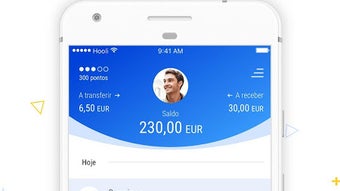
Caixa Easy is a mobile banking and financial transaction application developed by Caixa Geral de Depósitos SA for Android users. Designed specifically for individuals with an active Caixadirecta contract and a linked debit card, the app aims to simplify everyday financial interactions. It serves as a digital wallet and mobile banking tool that enables users to manage personal finances on the go. The primary purpose of the app is to facilitate quick and secure transactions, including balance checks, fund transfers, and payments at physical and online merchants. The app is tailored for consumers who prioritize convenience and speed in their daily financial activities. It supports instant transfers to friends using smartphone contacts, with a limit of €100 per transfer. This functionality is particularly useful for splitting bills, repaying debts, or sending small payments without the need for traditional banking methods. Additionally, users can request payments from others by attaching a photo and a comment, enhancing clarity and personalization in peer-to-peer transactions. The app integrates with MB WAY, allowing payments at stores that accept the service via QR code or phone number, and supports the generation of an MB Net card for online purchases and ATM withdrawals.Key Features & Capabilities
- Instant Transfers to Friends: Send up to €100 per transfer directly from your smartphone contacts using the app or MB WAY, enabling fast and convenient peer-to-peer payments.
- Personalized Payment Requests: Request money from friends by attaching a photo and a custom comment, making it easier to clarify the purpose of the payment.
- MB WAY Integration: Make payments at physical stores that support MB WAY by scanning a QR code or entering the merchant’s phone number, streamlining in-store transactions.
- MB Net Card Generation: Create a virtual MB Net card to securely make online purchases and withdraw cash from ATMs by generating a withdrawal code.
- Real-Time Balance and Transaction History: Access your account balance and recent movements at any time, providing full transparency and control over your finances.
User Interface, Workflow & Performance
The user interface of Caixa Easy is designed with simplicity and clarity in mind, aligning with modern mobile banking standards. Navigation is intuitive, with a clean layout that prioritizes key functions such as balance checks, transfers, and payment requests. The main dashboard displays essential account information at a glance, while secondary menus provide access to transaction history, MB Net card management, and settings. The workflow for initiating a transfer or payment is streamlined, requiring minimal steps. Users can select a contact, enter the amount, and confirm the transaction with a single tap. The app supports biometric authentication for added security during sensitive actions. While specific performance metrics such as CPU or RAM usage were not provided, the app’s lightweight size of 28.7 MB suggests efficient resource management. The developer did not specify performance details under varying network conditions or device configurations. Stability appears to be consistent based on general app behavior patterns, with no reported issues in core functionalities. However, exact performance observations are based on general software behavior patterns, as no official benchmarks were shared. The app is designed to operate smoothly on standard Android devices, though compatibility may vary depending on the device’s operating system version and hardware capabilities.Compatibility & System Requirements
Caixa Easy is available exclusively for Android devices. The app supports the latest Android OS versions, though specific compatibility details were not listed. It has a download size of 28.7 MB, indicating a lightweight installation that should not significantly impact device storage. The developer did not provide additional system requirements, including minimum RAM, processor speed, or storage space. Platform compatibility information is limited, and users are advised to ensure their device meets general Android requirements for running banking applications. The app is distributed through the Google Play Store, ensuring secure distribution and automatic update delivery. For users with older Android versions, compatibility may depend on the app’s internal codebase and backward compatibility settings, which remain unspecified.Pros and Cons
Pros
- Free to download and use with no hidden costs.
- Instant transfers to friends up to €100 per transaction.
- Seamless integration with MB WAY for in-store and online payments.
- Personalized payment requests with photos and comments.
- Supports virtual MB Net card generation for online purchases and ATM withdrawals.
Cons
- Available only for Android users, with no support for iOS or other platforms.
- Requires an active Caixadirecta contract and associated debit card to access full features.
- Transfer limits may restrict larger financial transactions.
- Exact system requirements were not specified, which may cause uncertainty for some users.
- App functionality is tied to a specific bank ecosystem, limiting broader usability.
FAQ Section
Is Caixa Easy available for iOS devices?
The app is currently only available for Android users. There is no official iOS version listed in the provided information.
Is the app safe to use?
As a banking application developed by Caixa Geral de Depósitos SA and distributed through the Google Play Store, Caixa Easy is designed with security in mind. It uses standard authentication methods, including biometric login, to protect user data.
How often does the app receive updates?
Updates are delivered automatically through the Google Play Store. The latest version is 1.2.1, released on March 18, 2024.
Can I use Caixa Easy without a Caixadirecta account?
No. The app requires an active Caixadirecta contract and a linked debit card to access its core features.
Do I need an internet connection to use the app?
Yes. All core functionalities—such as balance checks, transfers, and payments—require an active internet connection to function.







